
A WordPress plugin from Wilder Labs Studio
Your client finishes the page. You keep the final say.
Sites stop stalling on client content. Your clients pin notes, try their own photos and fix their own copy right on the page. Nothing on the site changes until you approve it.
Free plugin: in review at WordPress.org now. Pro opens February 2, 2027.
The site is built. Then it waits.
Most web projects don't stall on the build. They stall waiting on the client: their photos, their wording, their go-ahead.
Feedback arrives in pieces
Emails, texts, a PDF with arrows, a Word file of screenshots. You piece it back together before you can start.
Photos and copy come late
The client has the right photos on their phone and the right words in their head. Getting them onto the page takes weeks.
Every change still runs through you
Handing clients the editor is risky. Keeping it means you do every small change by hand.
How it works
You send one link. Your client works on the real page. You approve what stays.
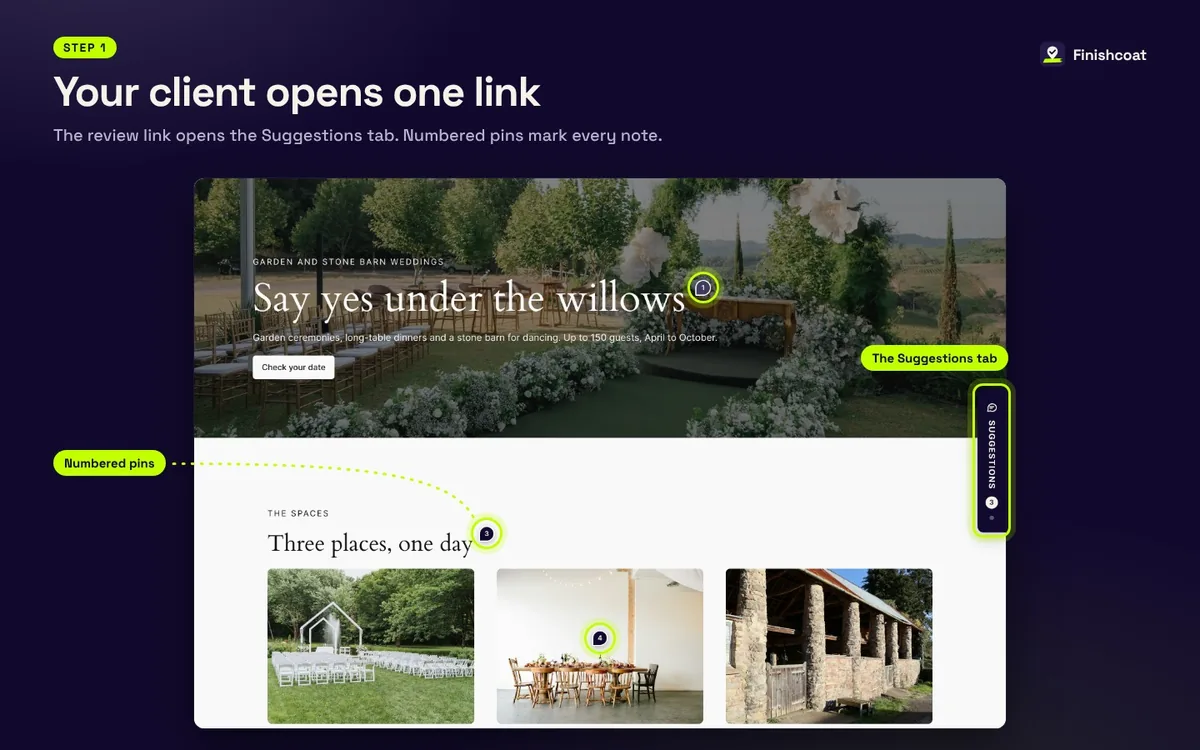
Your client opens one link
The review link opens the Suggestions tab on your staging or live site. Numbered pins mark every note. No account to make, no software to learn.
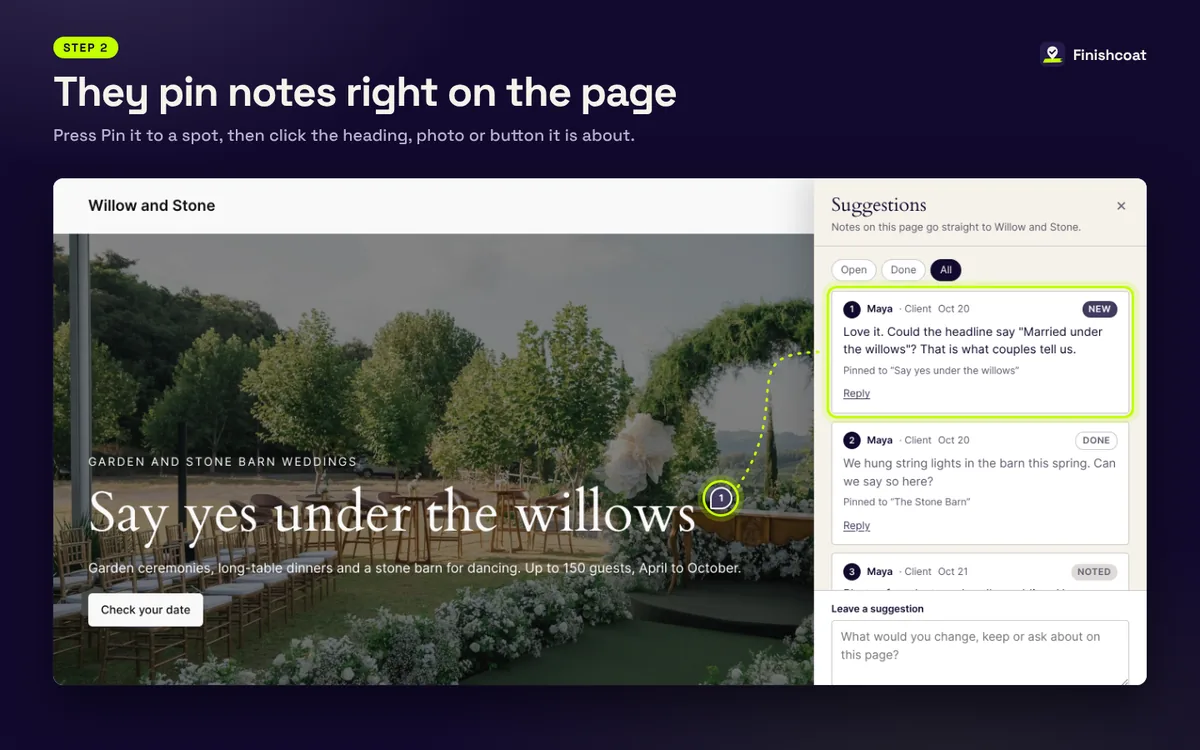
They pin notes right on the page
Click the heading, photo or button a note is about. The note sticks to that spot, so you never have to guess which "the photo at the top" they mean.
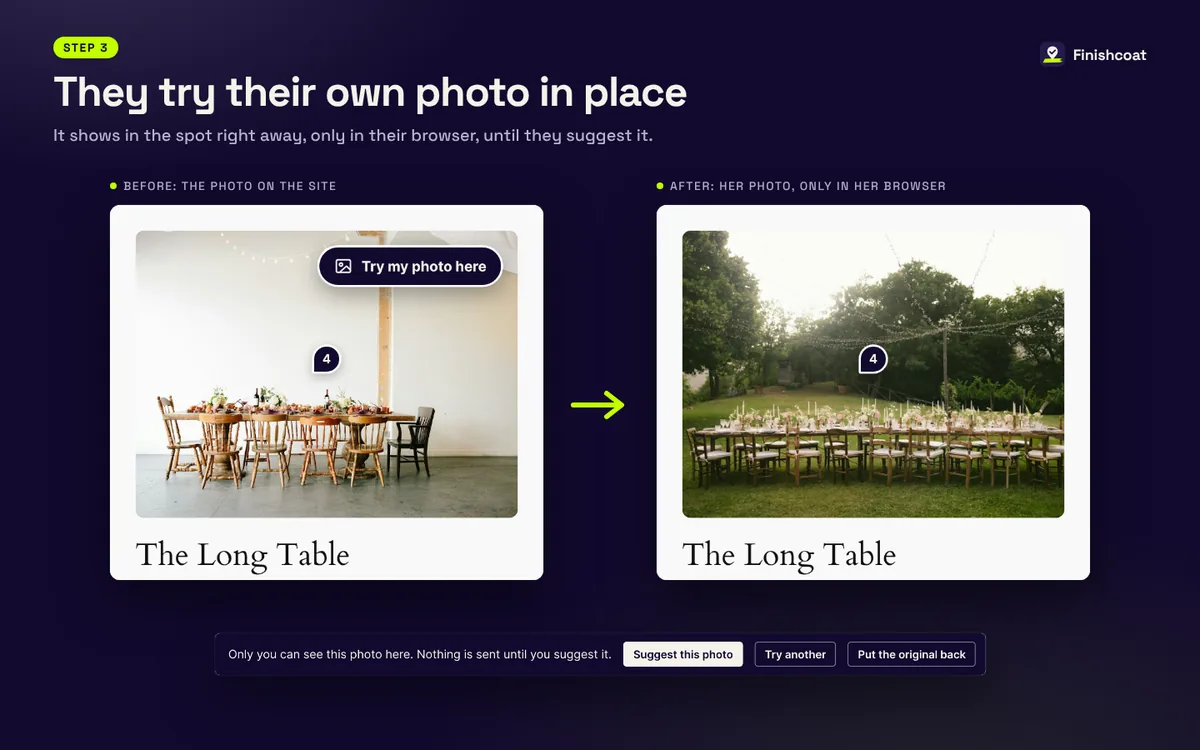
They try their own photo in place
Try my photo here shows their photo in the spot right away, only in their browser. If they like it, they suggest it to you. Nothing on the site changes.
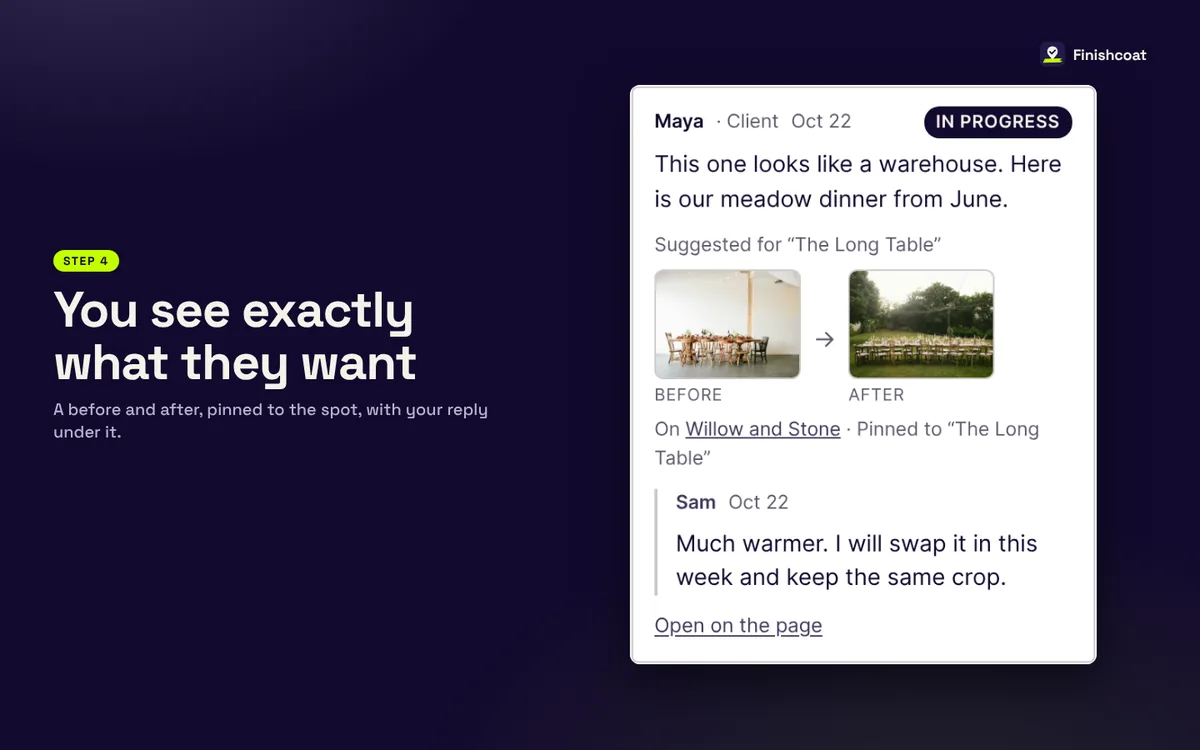
You see exactly what they want
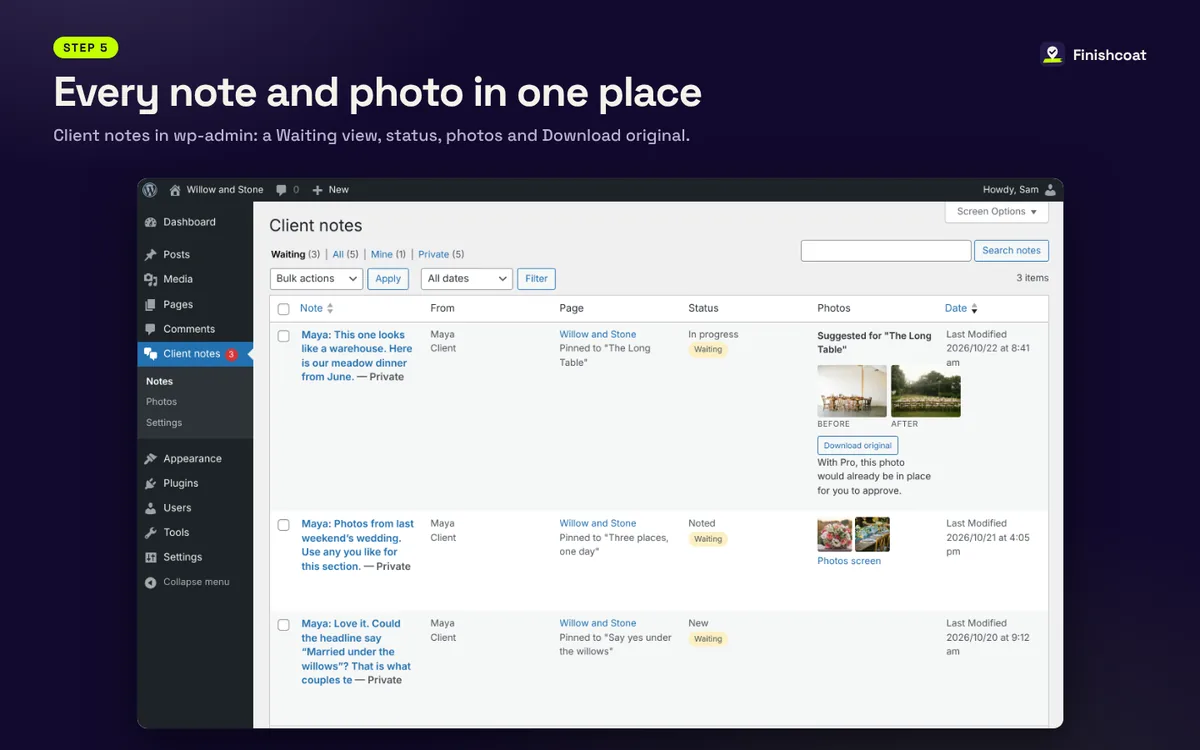
Every suggested photo shows up as a before and after, pinned to the spot, with your reply under it.
Every note and photo in one place
Client notes live in wp-admin with a Waiting view, status for each note, every photo and a Download original button.
Only people with the code get in
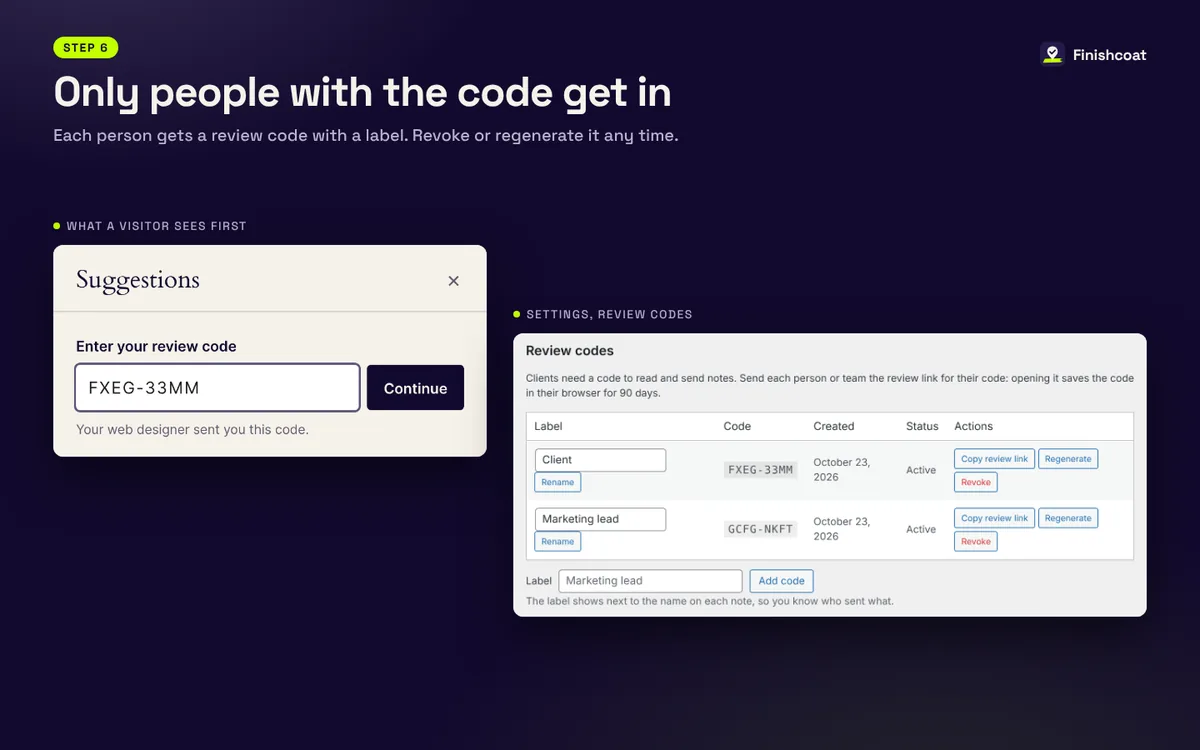
Each person gets a review code with a label, so you know who said what. Revoke or regenerate a code any time.
Free to start. Pro when clients do more.
The free plugin covers notes, photos and previews on one site. Pro lets clients put changes in place for you to approve, across all your client sites.
| Feature | Free | Pro |
|---|---|---|
| Review link and review codes | Yes | Yes |
| Notes pinned to any spot, replies and email alerts | Yes | Yes |
| Clients attach their own photos | Yes | Yes |
| Try my photo here, a preview only the client sees | Yes | Yes |
| Suggest this photo, with before and after | Yes | Yes |
| Use this photo: the swap is saved in place, waiting for your approval | No | Yes |
| Adjust: focus point, light, warmth and your brand looks | No | Yes |
| Photo library with suggested photos for each spot | No | Yes |
| Photos from Google Drive, Dropbox and OneDrive links | No | Yes |
| Text touch-ups with strike-out, you accept or reject | No | Yes |
| Many client sites from one dashboard | No | Yes |
| Review dashboard and weekly summary email | No | Yes |
| White label: your logo and name, no Finishcoat mention | No | Yes |
Pricing
Every Pro plan includes every Pro feature. The plans differ only in how many client sites they cover. Finished jobs you archive don't count.
Free
$0
1 site
- Notes, photos and previews
- Review codes
- Forum support
In review at WordPress.org now
Pro Solo
$49 a year
3 active client sites
- Every Pro feature
- Staging and live installs
- Email support
Opens February 2, 2027
Pro Studio
$129 a year
25 active client sites
- Every Pro feature
- Staging and live installs
- Email support
Opens February 2, 2027
Pro Agency
$249 a year
Unlimited client sites
- Every Pro feature
- Unlimited installs
- Priority email support
Opens February 2, 2027
Built to sit quietly on your site
Finishcoat runs inside your own WordPress. There's no outside service to sign up for and nothing to keep paying per seat.
No outside calls
The free plugin sends nothing to us or anyone else. Notes and photos stay in your WordPress.
No client accounts
Clients use a review link and a code. They never see wp-admin.
Works with your theme
Made with Divi 5 builders in mind and runs on any WordPress theme.
Leaves when you want
Turn it off when the job is done. Notes stay unless you choose to delete them.
Questions
Should I use it on a staging site or my live site?
Either works. Staging is the safest place for client reviews while you build. On a live site, Finishcoat only shows to people who open the review link, and only people with a code can read or send notes.
Can my client break the site?
No. In the free plugin, a client's photo preview shows only in their own browser, and suggestions wait for you on the board. In Pro, a swap is saved in place but marked as waiting until you approve it or put the original back.
Do my clients need an account or an app?
No. They open the review link you send, enter their code once, and start pinning notes in their normal browser, on a computer or a phone.
Where are client photos kept?
Photos clients attach are saved in your own WordPress uploads, with the original kept for download. With Pro, photos from Google Drive, Dropbox or OneDrive links are shown from those links, so big libraries don't have to live on your site.
What happens if I don't renew Pro?
Every client project that is running keeps working, and your clients see no change. You stop getting updates and support, and you can't start new Pro projects until you renew.
When can I get it?
The free plugin is in review at WordPress.org now and goes live as soon as it's approved. Pro opens February 2, 2027. Join the waitlist and you'll get an email for each, plus first word on the lifetime deal.
Get it first
Join the waitlist for an email when the free plugin goes live, an early look at Pro and first word on the 100 lifetime licenses.
Questions? Email finishcoat@wilderlabs.studio.