Blog › Founder AI › Claude, plainly
DOClaude, plainly
Stop typing: talk your first drafts
Set up voice to text and teach Claude the words it keeps getting wrong.
- Job
- Talk instead of type, and receive clean text
- Time
- About 30 minutes
- Plan needed
- Claude Free
- Difficulty
- Easy
- You'll have
- Voice typing turned on, a word list Claude follows and a fix list that improves every time it mishears you
I timed my own rants, and I talk at about 145 to 165 words a minute. The average typist manages about 52. A fast typist at 70 words a minute still types at less than half my speed. For a first draft, talking wins.
If you've never dictated a word, that's fine. You don't need new software or a new microphone. The computer or phone you already own can do it, and so can the Claude app.
The talking is the easy part. Names are where it stumbles. Say "Siobhan," and voice typing may write "Shivon." The fix comes in two steps. First, set up the microphone. Next, give Claude a list of your words, so it corrects the misses and tells you what it changed.
What you need
- A computer with a microphone, or your phone
- A Claude account (Free works and includes Projects)
- About 10 minutes to list the names you say every day: staff, clients, vendors, products, places
- A quiet spot for your first few tries
Turn on voice typing, device by device
Windows, Mac, iPhone and Android all have voice typing built in. Here's where to find it, as of October 20, 2026.
| Device | How to start | Settings to check |
|---|---|---|
| Windows 10 or 11 | Click in any text box, press the Windows key and H, and wait for "Listening..." | Click the gear in the voice typing box. Turn on Automatic punctuation and pick your Default microphone. It needs an internet connection. |
| Mac | Turn it on in Apple menu > System Settings > Keyboard > Dictation. Start it with the Microphone key, a shortcut you choose (like pressing Fn twice) or Edit > Start Dictation. | Same screen: Auto-punctuation, Microphone source and Languages. |
| iPhone | Tap the microphone on the keyboard. | Settings > General > Keyboard > Enable Dictation. |
| Android (Gboard) | Tap the microphone at the top of the keyboard. When you see "Speak now," start talking. | None needed. |
| Claude app on your phone | Tap the microphone in the message box. | Pick your language the first time. To change it later, tap your initials, then Speech Input Language. |
| Claude on a computer | Click the mic in the message box, talk, then send when you're ready. | Mac desktop app: an optional Caps Lock shortcut, in Settings > General. |
Skip the sound wave next to Claude's mic for now. That button starts voice mode, a spoken back-and-forth where Claude answers out loud. It's in beta on every plan, and it counts toward your usage. For a draft, use the mic.
The prompt
This prompt goes in a Claude Project's instructions, so every chat in that Project follows it.
I talk most of what I write, and my speech-to-text gets some words wrong.
Correct spellings: [names of staff, vendors, products, places]. Known mix-ups: [what it hears] means [what I said].
When I paste dictated text, fix those words and the punctuation. Keep my wording and my order. Don't make it sound fancier. At the bottom, list every word you changed.
Replace the highlighted parts with your own details.
Replace the words in [brackets] with your own.
Here's a sample list for a made-up five-person insurance agency.
Correct spellings: Siobhan, Nguyen, Marisol, Okafor, Safeco, Erie, QuickBooks, ACORD 25, BOP, COI.
Known mix-ups: "Shivon" means Siobhan. "win" means Nguyen. "oak offer" means Okafor. "safe co" means Safeco. "a cord 25" means ACORD 25. "bob" means BOP.
To build your own list, start with your staff and client lists, your vendors and your price sheet or form list. When a mix-up is also a real word, like "win" or "bob," Claude reads the whole sentence to decide. Check those words in the change list.
Steps
How to talk so it types well
- Wait for the cue before you speak. Windows shows "Listening..." and a Mac plays a tone or pulses the cursor. If you start early, you lose your first words.
- Say the punctuation out loud: "period," "comma," "question mark," "new line," "new paragraph." Windows, Mac and Gboard all understand those words.
- With automatic punctuation on, you can skip most of that.
- Talk in short bursts: one thought, then a breath. A Mac stops listening after 30 seconds of quiet, so a long pause means pressing the key again.
- On Windows, "scratch that" or "delete that" takes back what you just said. You can also keep talking and let the cleanup catch it.
- Keep the mic close. A headset works, or hold your phone near your mouth.
What it looks like when it's done
Here's a made-up sample that uses the agency list above. This is what voice typing returned:
hey shivon quick one for thursday dana oak offer moved her meeting to 2 30 so can you pull her safe co renewal before then tell win the a cord 25 for her landlord has to go out by friday at noon
also she wants a quote on a bob for the new shop can you start a file for it before you leave thanks
This is what Claude sent back from the Dictation Project:
Hey Siobhan, quick one for Thursday. Dana Okafor moved her meeting to 2:30, so can you pull her Safeco renewal before then? Tell Nguyen the ACORD 25 for her landlord has to go out by Friday at noon.
Also, she wants a quote on a BOP for the new shop. Can you start a file for it before you leave? Thanks.
Changed: "shivon" to Siobhan, "oak offer" to Okafor, "2 30" to 2:30, "safe co" to Safeco, "win" to Nguyen, "a cord 25" to ACORD 25, "bob" to BOP. Added capitals, commas, periods and two question marks.
Notice what it left alone. "Quick one," "the new shop" and "before you leave" all stayed. It's still your note, now spelled correctly.
Here's a real example from one of my recordings. The raw transcript read: "We're going to have them use cloud AI to create artifacts and apps for reading their voice, using open whisper." The corrected copy changed "cloud AI" to Claude AI and "open whisper" to OpenAI Whisper.
Check the result
- The names on your list come back spelled correctly.
- The text still sounds like you. If Claude polished it, tell it to put your words back.
- The change list at the bottom matches what you see.
- After a week, the fix list is shorter, because the prompt already covers your common mix-ups.
- If an accent, a speech difference or a loud room keeps confusing it, the word list still helps. Type the parts that don't come through.
If it goes wrong
The same names keep coming out wrong
Your computer's voice typing never sees your Claude word list. Claude's own mic has no custom word list either, as of October 20, 2026. That means the fix happens after you talk. Put every miss on the mix-up line exactly as it came out. On a Mac, words it isn't sure of get a blue underline; click one to pick the right word.
Claude rewrote it to sound fancy
Tell it, "Put my words back. Only fix spelling and punctuation." Then check two things. First, make sure the "Don't make it sound fancier" line is still in the Project instructions. Second, make sure you're in a chat inside the Dictation Project, because a chat outside the Project never sees those instructions.
The punctuation is a mess
Turn on Automatic punctuation (Windows) or Auto-punctuation (Mac) in the settings from the table above. You can also leave it off, since the prompt already tells Claude to fix punctuation.
An accent or a loud room keeps confusing it
Tell your computer which English you speak. Windows offers English for the US, UK, Canada, Australia, India and New Zealand under Settings > Time & language > Language & region. On a Mac, go to Keyboard > Dictation > Languages. Then move closer to the mic.
You're not sure where your words go
Here's what each option does with your voice, as of October 20, 2026:
- Windows voice typing sends your speech online to Microsoft's Azure Speech services. Some newer Copilot+ PCs add "fluid dictation," which runs on the computer itself.
- On a Mac, the note under Dictation in Keyboard settings tells you whether it's processed on your Mac. Sharing recordings with Apple is a separate switch called "Improve Siri & Dictation."
- Claude's mic deletes your audio once it's turned into text. Anthropic says it doesn't keep that audio or train on it.
- On Free, Pro and Max, Anthropic trains on your chats only if you allow it or send feedback with the thumbs buttons. You can check that choice in Claude's privacy settings.
Whichever one you use, don't dictate Social Security numbers, medical details or discipline notes into a personal account.
Common questions
How do I talk to Claude instead of typing?
Click or tap the mic in Claude's message box and talk. Your words appear as text you can fix before you send. Your computer's own voice typing works in Claude's message box too.
Does Claude learn my voice?
No. Claude doesn't train itself on how you sound, and its mic deletes the audio after transcribing it. What improves is your list. Every mix-up you add to the Project instructions is one Claude fixes from then on. Memory, which is on by default for Free, Pro and Max, can remember the people and places in your work. It doesn't change what the microphone hears.
How do I get AI to write like me?
Start by talking. Dictated text is already in your words, and the prompt tells Claude to keep them. For drafts written from scratch, Claude has Styles: give it a sample of your writing, and it builds a style to match.
Do I need a paid plan for this?
No. As of October 20, 2026, Free includes up to five Projects with instructions, plus the mic and voice mode. Voice typing on Windows, Mac and your phone costs nothing extra.
Go further: build your own recorder (Pro)
- Job
- Talk Claude Code through building your own voice recorder for Windows
- Time
- An afternoon
- Plan needed
- Claude Pro or higher (Claude Code isn't on Free)
- Difficulty
- Advanced
- You'll have
- A shortcut that records, saves audio and text to dated folders, fixes your words and can paste into the box you're typing in
Who this is for: you've done the steps above, you're on a Windows PC and you want your own tool instead of someone else's text box. "Pro" marks the advanced build, and it's still free to read.
What you need
- A Windows 10 or 11 PC with a microphone. As of October 20, 2026, Claude Code needs Windows 10 version 1809 or later, 4 GB of memory or more and an internet connection.
- A paid Claude plan. Claude Code comes with Pro, Max, Team and Enterprise, not Free. As of October 20, 2026, Pro is $20 a month, or $17 a month billed yearly.
- The Claude desktop app for Windows. Its Code tab is Claude Code with buttons instead of a terminal, so you don't need to install Claude Code separately.
- A new, empty folder for the project, like C:\Recorder.
- Your word list from the Dictation Project.
The prompt
I want my own voice recorder app for this Windows PC. I'm not a programmer, so explain each step in plain words and ask me before you install anything.
- One keyboard shortcut starts recording from anywhere in Windows, and the same shortcut stops it. Pick one that won't clash with Windows.
- Save each recording as an audio file and a text file, in a folder named by date.
- Turn the audio into text on this computer, with a free speech model that runs locally, like faster-whisper. Check whether I have an NVIDIA graphics card. If I don't, use a small model on the processor.
- Fix my words using a word list in a text file I can edit. Here's my list: [paste your word list and mix-ups]
- Optional, with an on and off switch: when I stop recording, paste the text into the box I'm typing in.
Build the simplest version that works first. Then show me how to test it, and how to start it when Windows starts.
Replace the highlighted parts with your own details.
You can talk this prompt in instead of pasting it. Click in the Code tab's message box, press the Windows key and H, and explain it the way you'd brief a contractor.
Steps
What can go wrong
No strong graphics card. Without one, the speech model runs on your processor, and that's slower. OpenAI's Whisper comes in six sizes, from tiny, which needs about 1 GB of graphics memory, to large, at about 10 GB. In faster-whisper's own test on a fast desktop processor, the small model turned 13 minutes of audio into text in 1 minute 42 seconds. An older laptop will take longer.
If that's your setup, ask for a smaller model or an English-only one. Whisper's notes say the English-only versions perform better, especially the two smallest. The cloud is another option: Windows voice typing, from earlier in this post, already runs online.
Windows security prompts. Windows may ask permission when Claude Code installs tools. A program with no publisher signature can trigger "Windows protected your PC," and you'd have to choose "Run anyway." Only allow what you asked Claude Code to build or install. On a work computer, your IT settings may block it.
Microphone permissions. If the audio file is silent, open Start > Settings > Privacy & security > Microphone. Turn on Microphone access, then turn on "Let desktop apps access your microphone."
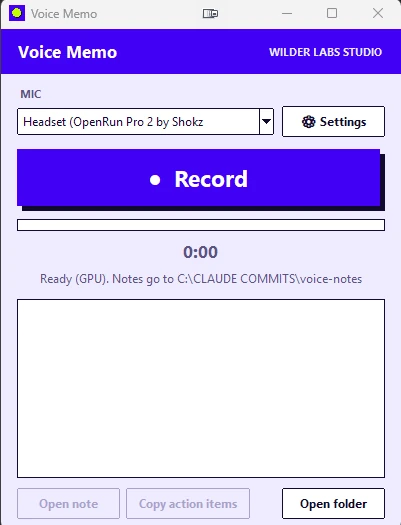
How I do it. I built my own voice recorder for Windows with Claude Code. An item in my daily brief on October 20 gave me the idea, and I talked the whole build through with Claude Code until it made a working Windows app.
The app has a shortcut that records and saves each recording to folders. When I want it to, it can also fill in a prompt box for me. It runs on my own PC, and the project lives in my Claude Code.
It turns the audio into text on my computer and feeds the speech engine a word list, so it spells Claude, MCP and my vendors correctly. It also keeps a running fix list. One of my early rants came back with "cloud" for Claude and "Slumbers" for plumbers. Those mistakes no longer appear.
Not everyone has a strong graphics card, and you don't need one to start. The Pro section above covers what to do without one.

Jef Wilder
Twenty-five years in hospitality and technology, across business development, project management, tech and sales. He helps founders and professionals over 40 put Claude to work, one task at a time.
If you'd rather talk it through, there are three easy ways.
Founder AI is an independent series by Jef Wilder. It is not affiliated with, sponsored by, or endorsed by Anthropic. Claude is a trademark of Anthropic.
Published by Wilder Labs Studio